Add concerts
There are four ways to add a concert you went to. Pick the one that fits what you have.
How do I add a concert I went to?
- Tap Concerts.
- Tap + at the top. On a computer it says Add concerts.
- Pick one of the four ways. Not sure which? See "Which way should I use?" below.
No concerts yet? Tap Add concerts in the middle of the page.
You need to be signed in to save concerts.
Which way should I use?
- Find by artist: you remember the band.
- Paste a list: you have your shows written down somewhere, like a note on your phone.
- Import from setlist.fm: you already mark shows on setlist.fm.
- Add one by hand: setlist.fm doesn't have the show.
How do I use Find by artist?
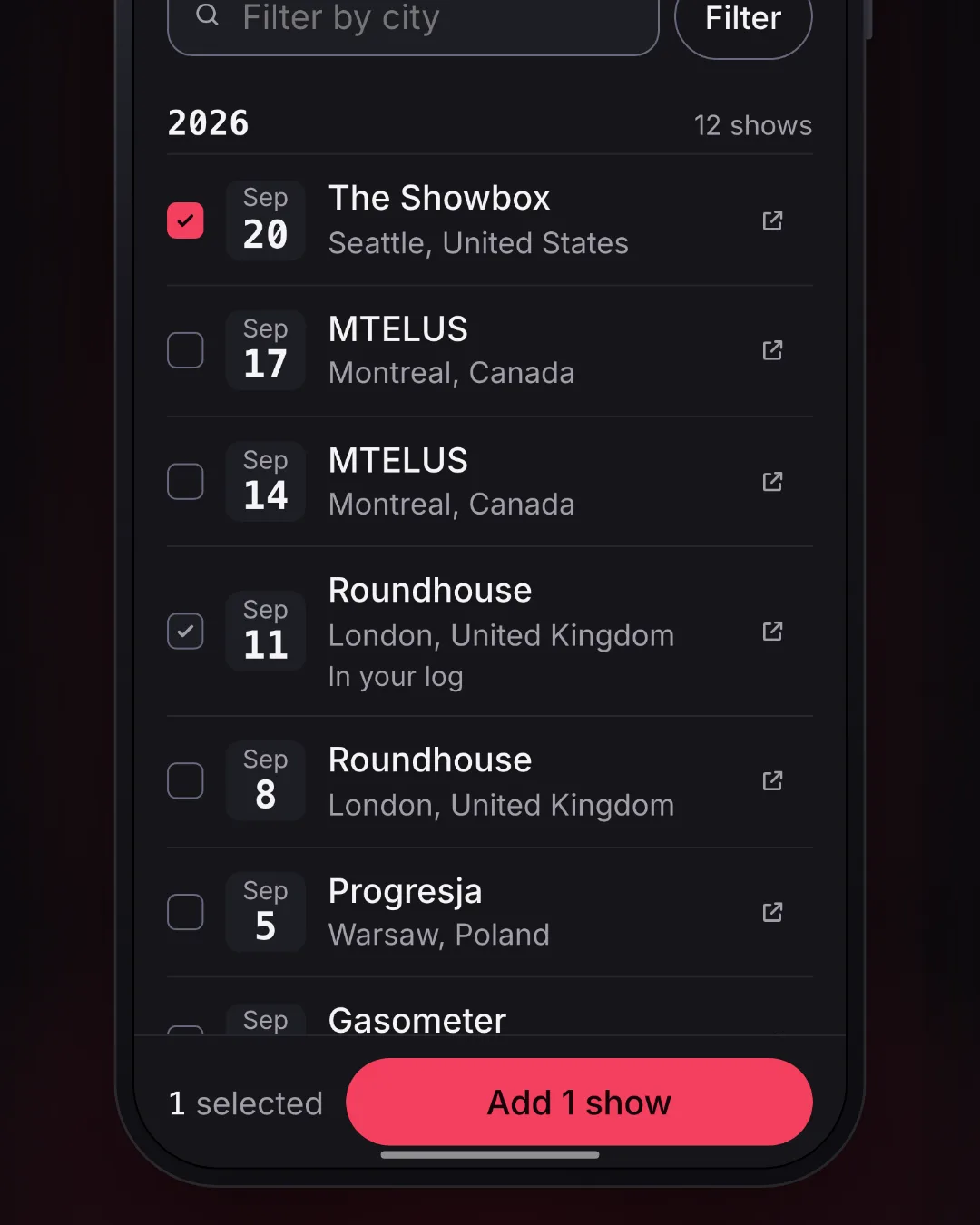
A silent clip. On My concerts, the Add button opens Add concerts, and Find by artist is tapped. The band Opeth is typed and picked, and one of its shows is ticked: Sep 20, 2026, at The Showbox in Seattle. Another show in the list already says In your log. Add 1 show adds it, the next screen says Added 1 show, and View my concerts goes back to the log. The new show is highlighted at the top, and the count now reads 16 shows. The shows in it are sample data.
- Tap +, then Find by artist.
- Type the band's name, then tap the band.
- Tap each show you went to. A tick means it's picked.
- Tap Add at the bottom. The button says how many you picked, like Add 1 show.
- Tap View my concerts to see them.
Good to know:
- A show you've already added says In your log. You can't tick it again.
- Looking for one city? Type it in Filter by city, then tap Filter. Use the whole city name, like "Montreal". In the app, tap search on your keyboard instead.
- The newest shows come first. To see older ones, tap Load more shows (in the app, Load more) at the end of the list.
- You can add up to 100 shows at a time. Want more? Add these first, then pick the rest.
- If it says to wait a moment, wait, then tap Add again. Your ticks stay put.
How do I use Paste a list?
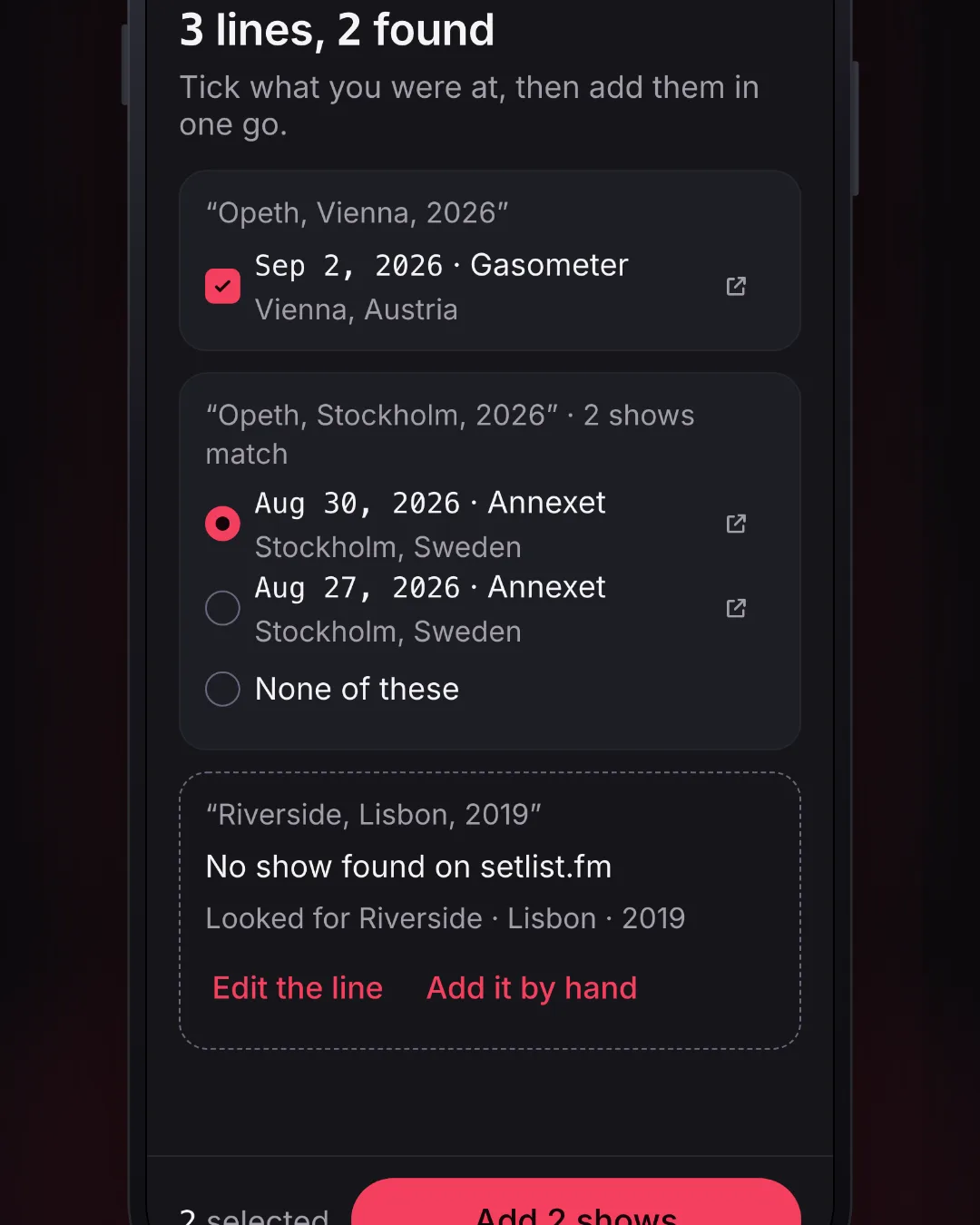
A silent clip. On My concerts, the Add button opens Add concerts, and Paste a list is tapped. Three shows are pasted, one per line, and Find shows looks each line up. The first line matches one show, which is ticked already. The second matches two shows, and the right one is picked. The third finds nothing and offers Edit the line and Add it by hand. Add 2 shows adds them, and View my concerts goes back to the log. The two new shows are highlighted, and the count now reads 17 shows. The shows in it are sample data.
- Tap +, then Paste a list.
- Paste your shows, one show per line. Put the band, where, and when. A year is enough, like "Opeth, London, 2019".
- Tap Find shows. Each line is looked up on setlist.fm.
- Tick the shows that are right.
- Tap Add at the bottom. The button says how many, like Add 4 shows.
If a line could be more than one show, pick the right one. Or pick None of these. In the app, just leave it unpicked.
If a line says No show found on setlist.fm:
- Tap Edit the line to fix it, then tap Find shows again.
- Or tap Add it by hand to type the show in yourself.
You can paste up to 50 lines at a time. On the website, if you paste more, it asks you to take some out first. In the app, only the first 50 lines are looked up, and it tells you how many were left over.
How do I import from setlist.fm?
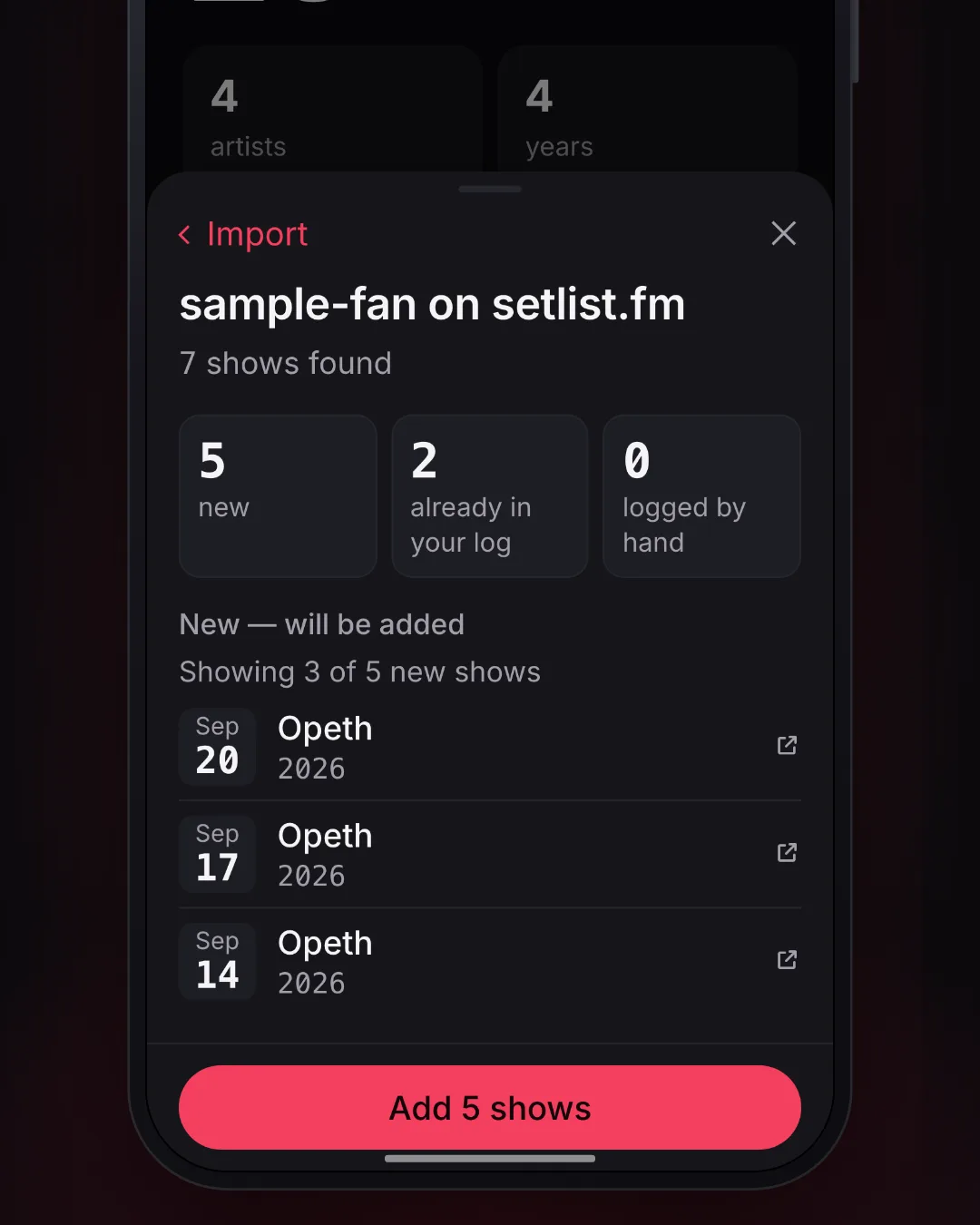
A silent clip. On My concerts, the Add button opens Add concerts, and Import from setlist.fm is tapped. A made-up setlist.fm username is typed, and Preview import finds 5 new shows and 2 already in the log. Add 5 shows brings the new ones in, the next screen says Added 5 shows, and View concerts goes back to the log. It scrolls down to the five new shows, highlighted. The shows in it are sample data.
This brings in the shows you marked "I was there" on setlist.fm.
- Tap +, then Import from setlist.fm.
- Type your setlist.fm username.
- Tap Preview import. You see what's new before anything changes.
- Tap Add at the bottom. The button says how many new shows there are, like Add 12 shows.
Marked more shows on setlist.fm since then?
- Tap +.
- Under Import from setlist.fm, tap Check for new shows.
Changed your mind? Right after an import, tap Undo import. Later, open Import from setlist.fm and tap Undo last import.
Undo takes out the shows that import added, and any ratings or notes you gave them. Shows you added yourself stay.
How do I add a show by hand?
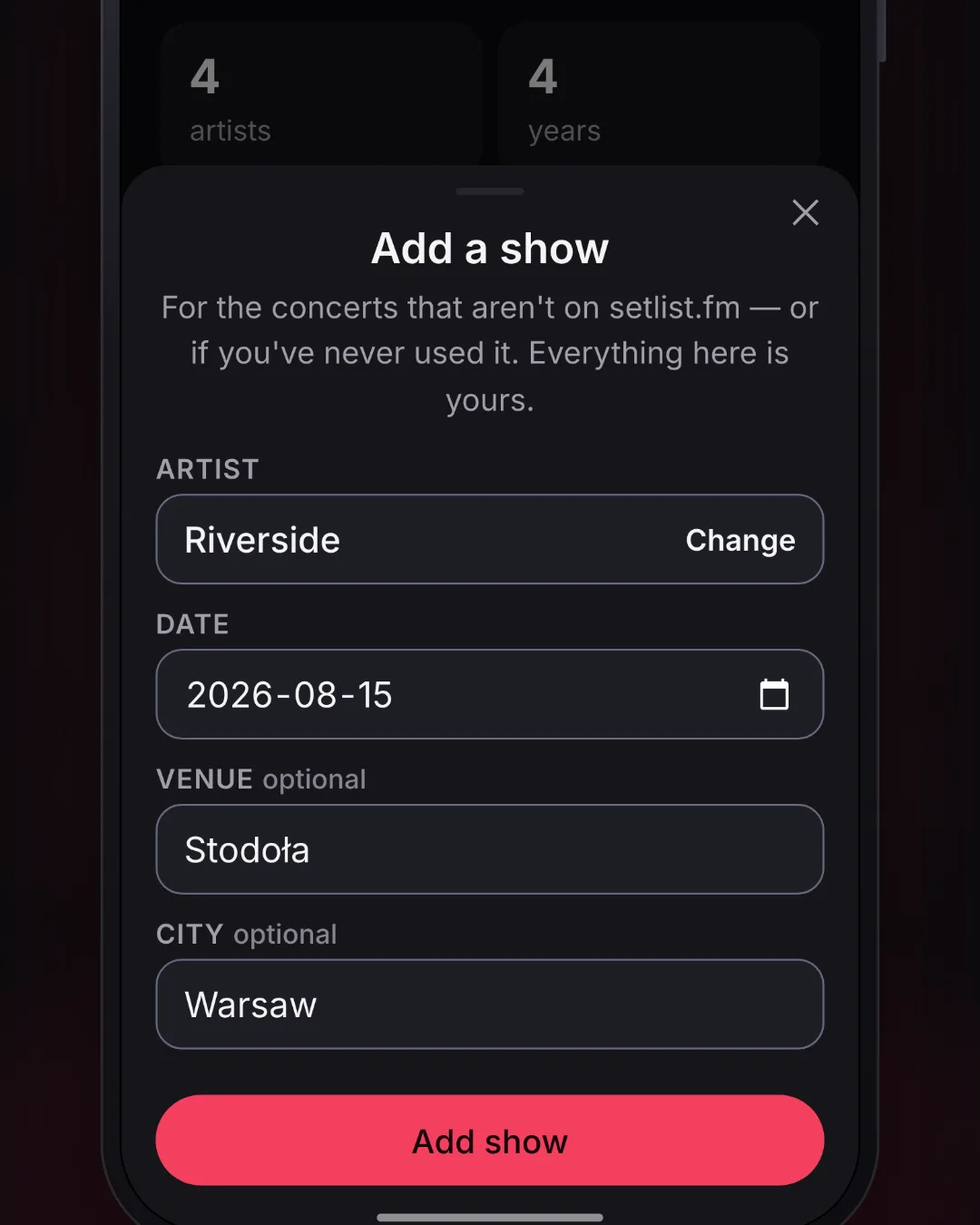
A silent clip. On My concerts, the Add button opens Add concerts, and Add one by hand is tapped. The band Riverside is typed and picked from the list, then a date, a venue and a city are filled in. Add show saves it and opens the show's own page, and Back goes to My concerts. The new show is highlighted, and the count now reads 16 shows. The shows in it are sample data.
Use this when setlist.fm doesn't have the show.
- Tap +, then Add one by hand.
- Type the band's name. Tap the band in the list, or tap Use "…" to keep what you typed.
- Pick the Date. It has to be a show you've already been to.
- Fill in the Venue and City if you like. You can skip them.
- Tap Add show.
What you type is saved just as you wrote it. When you download your data, it's in there too.
What if I import twice?
Nothing is added twice. Only new shows come in.
The same goes for Find by artist and Paste a list. A show you already have says In your log or Already in your log, and it isn't added again.
What does Replace mean for a show I logged by hand?
Say you added a show by hand, and later you find the same night on setlist.fm. ConcertPrep asks before it changes anything.
- Replace puts setlist.fm's show in place of yours, with its setlist and venue. You keep your rating and notes.
- Keep my entry leaves your show as it is.
In Find by artist, the show says Logged by hand · Replace? Tap it, then tap Replace, keep my rating and notes. When you paste a list or import, tick the Replace box on that show instead.
If you typed in the setlist yourself, setlist.fm's setlist takes its place. ConcertPrep tells you before you choose.
What does Mark on setlist.fm do?
Right after you add shows with Find by artist or Paste a list, you see a screen like Added 1 show. Each show on it has a Mark on setlist.fm link. It opens that show on setlist.fm, where you can tap "I was there".
That screen is the only place with these links. Missed it? Open the show's setlist, and tap the setlist.fm link at the bottom. It opens the same show there. An import doesn't need the links: those shows are already marked on setlist.fm. A show you add by hand isn't on setlist.fm.
ConcertPrep can't mark shows for you. setlist.fm doesn't let other apps do that. You only need this if you also keep a setlist.fm profile.
Can I add a show from its setlist page?
Yes.
- Open the show's setlist.
- Tap I was there.
Do I need an account?
Yes, to save concerts. You can look at forecasts and setlists without one.